1
Best Overall
REDTIGER F7N Touch 4K Dash Cam
★★★★★
⭐9.6
5,900 reviews

REDTIGER F7N Touch 4K Dash Cam

Listed 4K front and 1080P rear recording; confirm the exact hardware revision at the retailer
3.18-inch touch screen plus voice control for hands-free operation
5.8GHz WiFi at 20MB/s download speed to smartphone
Product overview →
119.99
Check Price
Available atamazon
2
Best Value
REDTIGER F7NP 4K Dash Cam Front Rear
★★★★☆
⭐9.4
23,954 reviews

REDTIGER F7NP 4K Dash Cam Front Rear

Listed 4K front and 1080P rear recording; confirm the exact hardware revision at the retailer
5.8GHz WiFi at 20MB/s download speed via REDTIGER Cam app
128GB card included with supercapacitor for extreme temperature tolerance
109.99
Check Price
Available atamazon
3
TERUNSOUl 4K+4K Dual Dash Cam
★★★★☆
⭐9.3
4,982 reviews

TERUNSOUl 4K+4K Dual Dash Cam

True 4K front + 4K rear simultaneous recording
Free 128GB memory card included
170-degree ultra-wide front angle captures 6-lane roads
109.97
Check Price
Available atamazon
4
ROVE R2-4K Dual STARVIS 2 Dash Cam
★★★★☆
⭐9.2
10,879 reviews

ROVE R2-4K Dual STARVIS 2 Dash Cam

Sony STARVIS 2 IMX675 sensor for exceptional clarity
5GHz WiFi with 20MB/s download speed
Free 128GB ROVE PRO card included
109.98
Check Price
Available atamazon
5
Best for Rideshare
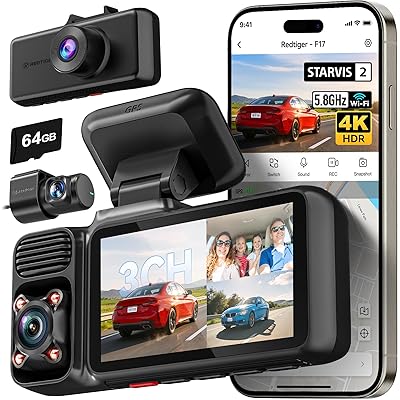
REDTIGER F17 4K 3-Channel Dash Cam
★★★★☆
⭐9.1
2,575 reviews

REDTIGER F17 4K 3-Channel Dash Cam

3-channel: 4K front + 1080P interior IR + 1080P rear simultaneous recording
STARVIS 2 IMX675 HDR sensor with WDR for balanced exposure
4 IR lights illuminate cabin without disturbing passengers
149.99
Check Price
Available atamazon
6
Best Mirror Cam
WOLFBOX G840S 12" 4K Mirror Dash Cam
★★★★☆
⭐9
14,370 reviews

WOLFBOX G840S 12" 4K Mirror Dash Cam

12-inch smart rearview mirror replaces OEM mirror entirely
4K front + 1080P rear with 5.8GHz WiFi connectivity
Night vision with WDR technology for low-light driving
129.99
Check Price
Available atamazon
7
WOLFBOX G930 10" 4K Mirror Dash Cam
★★★★☆
⭐8.9
2,180 reviews

WOLFBOX G930 10" 4K Mirror Dash Cam

10-inch touchscreen — more compact than 12-inch G840S
4K front recording with WDR balanced exposure technology
5.8GHz WiFi connectivity with reverse assist lines
129.99
Check Price
Available atamazon
8
Best Premium
VIOFO A229 Plus Dual STARVIS 2 Dash Cam
★★★★☆
⭐8.8
1,800 reviews

VIOFO A229 Plus Dual STARVIS 2 Dash Cam

Dual Sony STARVIS 2 IMX675 sensors — front AND rear both premium
2K+2K recording at 1440P each camera with HDR on both channels
Voice control with 12 commands for hands-free operation
159.99
Check Price
Available atamazon
9
Best Compact
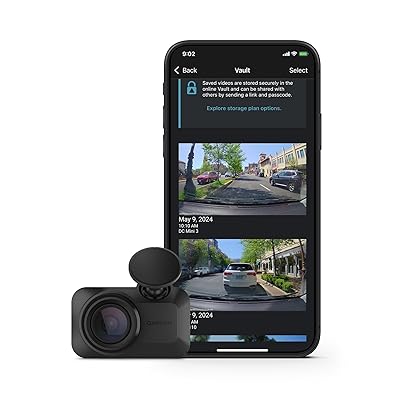
Garmin Dash Cam Mini 3 1080p
★★★★☆
⭐8.7
857 reviews

Garmin Dash Cam Mini 3 1080p

Key-sized ultracompact design — virtually invisible on windshield
Built-in Garmin Clarity polarizer lens reduces glare
Voice control for completely hands-free operation
127.99
Check Price
Available atamazon
10
VIOFO A119 Mini 2 2K Dash Cam
★★★★☆
⭐8.5
2,047 reviews

VIOFO A119 Mini 2 2K Dash Cam

2K 60fps or HDR 30fps STARVIS 2 front recording
Supercapacitor for safe operation in extreme temperatures
5GHz WiFi with voice control for hands-free operation
94.99
Check Price
Available atamazon

Quick Comparison

Compare
Resolution
WiFi
Screen
Rating
Reviews
Price
Overall Score / 10
REDTIGER F7N Touch 4K Dash Cam
REDTIGER F7N Touch 4K Dash CamCheck Priceon Amazon
4K+1080P
5.8GHz
3.18" touch
4.4
5900
$119.99
9.6
REDTIGER F7NP 4K Dash Cam Front Rear
REDTIGER F7NP 4K Dash Cam Front RearCheck Priceon Amazon
4K+1080P
5.8GHz
3"
4.2
23954
$109.99
9.4
TERUNSOUl 4K+4K Dual Dash Cam
TERUNSOUl 4K+4K Dual Dash CamCheck Priceon Amazon
4K+4K
5.8GHz
3"
4.8
4982
$109.97
9.3
ROVE R2-4K Dual STARVIS 2 Dash Cam
ROVE R2-4K Dual STARVIS 2 Dash CamCheck Priceon Amazon
4K+1080P
5GHz
3"
4.5
10879
$109.98
9.2
REDTIGER F17 4K 3-Channel Dash Cam
REDTIGER F17 4K 3-Channel Dash CamCheck Priceon Amazon
4K+1080P+1080P
5.8GHz
3"
4.5
2575
$149.99
9.1
WOLFBOX G840S 12" 4K Mirror Dash Cam
WOLFBOX G840S 12" 4K Mirror Dash CamCheck Priceon Amazon
4K+1080P
5.8GHz
12"
4.3
14370
$129.99
9
WOLFBOX G930 10" 4K Mirror Dash Cam
WOLFBOX G930 10" 4K Mirror Dash CamCheck Priceon Amazon
4K+1080P
5.8GHz
10"
4.4
2180
$129.99
8.9
VIOFO A229 Plus Dual STARVIS 2 Dash Cam
VIOFO A229 Plus Dual STARVIS 2 Dash CamCheck Priceon Amazon
2K+2K
5GHz
2"
4.4
1800
$159.99
8.8
Garmin Dash Cam Mini 3 1080p
Garmin Dash Cam Mini 3 1080pCheck Priceon Amazon
1080P
WiFi+BT
None
4.2
857
$127.99
8.7
VIOFO A119 Mini 2 2K Dash Cam
VIOFO A119 Mini 2 2K Dash CamCheck Priceon Amazon
2K 60fps
5GHz
None
4.3
2047
$94.99
8.5
👉 Scroll horizontally to compare more products • Click any column to view on Amazon

Why Consider a Dash Cam

A dash cam can record the view covered by its cameras. Choose the channel layout, recording settings, power arrangement and storage capacity for your vehicle. This guide does not promise that footage will resolve an insurance claim or repay the cost of the camera.

Footage as a Record

Check that recordings are usable before relying on the camera. Review sample clips from your installed device, make sure the clock is correct and learn how to preserve files after an incident. Resolution alone does not guarantee readable number plates.

Parking Recording Needs a Power Plan

Parking modes and their power requirements vary. Confirm the compatible hardwire kit or other power source and whether low-voltage protection is included. Do not assume every camera package includes battery protection or guarantees a particular number of recording hours.

Check Actual Low-Light Footage

Sensor model, exposure, optics, processing and movement all affect low-light recordings. Compare representative footage for the exact version and settings. A sensor family name is not a guarantee that moving number plates will be readable.

How to Choose the Best Dash Cam

Sensor Versions and Image Processing

Confirm the sensor specification for the exact model and hardware revision. Similar model names can refer to different versions. Compare real sample recordings as well as the spec sheet; this guide does not treat STARVIS 2 as a fixed multiplier of usable night-time detail.

REDTIGER F7N Touch 4K Dash Cam

Resolution and Channel Configuration

Check front, rear and interior recording settings separately, including which combinations operate simultaneously. A headline 4K claim may refer only to the front channel. Compare number-plate samples, HDR settings and frame rate under the conditions in which you drive.

Mirror, Windshield or Compact Camera

Choose a form factor that fits your vehicle and sight lines. Mirror models need a suitable mounting arrangement and rear-camera routing; windshield models need a secure position that does not obstruct the driver. Installation time depends on the vehicle and wiring route, so allow for professional installation if needed.

WiFi and File Transfer

WiFi band and advertised peak transfer speed do not guarantee the time needed to retrieve a clip. Phone compatibility, app behavior and file size matter. Check whether the exact camera supports the connection your phone uses and whether files can also be copied from the memory card.

Check What's Included

Check the selected retailer package for its memory card, rear or interior cameras, GPS module, cables and parking-mode power kit. Bundles change and similarly named listings can contain different accessories. Compare the total cost of the setup rather than assuming the headline price includes everything.

Options to Compare

Use the current product cards and verify the exact package. The options below describe selection considerations, not measured scores or guaranteed performance.

Touchscreen option:REDTIGER F7N Touch: compare its touchscreen controls and listed front/rear recording setup with the F7NP. Confirm the sensor revision and included accessories instead of assuming the cameras have identical hardware.
Alternative control layout:REDTIGER F7NP: compare its controls, supported recording modes and selected bundle. Review volume alone does not establish reliability, and current prices may change its value relative to the Touch model.
Dual-channel option:VIOFO A229 Plus: compare front and rear recording settings, sample footage and the required installation accessories. Decide whether that combination serves your driving conditions rather than relying on a premium label.

Frequently Asked Questions

Our catalog distinguishes touchscreen and button-based controls, but exact hardware and bundles may vary by revision and retailer. Confirm the model identifier, sensor, wireless connection and included card before purchase. The price difference is not fixed.

A rear camera adds coverage behind the vehicle but also requires mounting, wiring and storage. Choose coverage for your use, and check the rear recording settings rather than assuming they match the front camera. No channel layout guarantees that every incident or number plate will be captured.

Retention depends on the combined recording bitrate of all active channels, usable card capacity and space reserved for locked files. As an illustrative calculation, a total 20 Mb/s stream uses about 9 GB per hour before overhead; this is not a specification for any listed camera. Check the manual or measure a sample recording from your device instead of assuming all 4K cameras use 7 GB per hour. Parking recording also uses storage.

Check whether the display, mirror mount and rear-camera view suit your vehicle. Compare cable routing and the way you normally use your mirror. Installation time depends on the vehicle and accessory choices; this guide does not promise a universal installation time.

Yes, recording while parked uses power. Verify the approved power connection and low-voltage protection for the specific camera and kit. Available recording time depends on the battery, temperature, camera load and cutoff settings; do not rely on a promised overnight runtime.

Dash Cam Maintenance Checks

  • Back up important footage before formatting. Use a compatible card and follow the camera manual for formatting and maintenance.
  • Inspect the lens and windshield for dirt or reflections, and review a sample clip to confirm that the view is usable.
  • Check mounts and cable routing regularly. Follow the mount instructions for surface preparation and adhesive cure time.
  • Check power connections if recordings stop, restart or contain gaps. Confirm the correct power kit for your model.
  • Use only firmware intended for the exact model and hardware revision, following the manufacturer update instructions.
0 products selected for comparison